It is possible that when you connect to your web interface on PBXware, you are surprised by a Nginx 500 error: "500 internal server error"
Nginx, like Apache for example, is a web server. It is used by PBXware to respond to users’ HTTP requests.
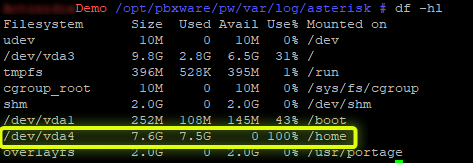
This error occurs when the main partition is full. You can check this by connecting via SSH to your machine and entering the command
df -hl
Here we can see that the partition /dev/vda4 assigned to the folder /home is at 100% disk usage and is therefore saturated.
Generally, it is the call logs or SIP registration logs that risk filling up the disk, which can be found in:
/opt/pbxware/pw/var/log/asterisk
You can check which file takes up the most space with this command:
du -sch
The command of is a Linux/Unix command that allows a user to quickly obtain information about disk usage.
The argument -s (summarize) allows summarizing.
The argument -c (total) allows adding the "total" line at the bottom of the command output to see the full disk space used.
The argument -h (human readable) allows file sizes to be displayed in an understandable format (in gigabytes, for example).
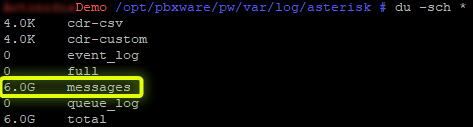
Here we see that the log file "messages” takes up the most space here. Two scenarios then arise:
In order to purge/empty the log file simply enter the following command:
cat /dev/null > messages
Once free disk space becomes available again on the /dev/vda4 partition, the 500 error should disappear.