



FR EN

SMS connector

Estimated reading: 8 minutes

One of the major new features in version 7.2 is the introduction of the SMS Connector API, which is a flexible and standardized interface used to send and receive SMS and MMS messages on PBXware using custom SMS bindings.

This feature allows our customers to develop middleware applications and connect the PBXware SMS service to SMS providers even if they are not currently supported in PBXware.

With a working middleware application, the subsequent configuration of PBXware is simple.

To create a custom network line, log in to your PBXware GUI and go to:

  • Multi-Tenant Edition:

Master Tenant > SMS > Trunks and click Add SMS Trunk.

  • CC/Business Edition:

SMS > Trunks and click Add SMS Trunk

Enter the name of your new SMS line (i.e. the custom SMS provider)

In the field Provider , in the drop-down list, select « Custom » .

The field Webhook URL must be filled in with the address to which SMS/MMS messages sent via gloCOM will be delivered.

With a custom provider selected, a new field, Auth Token, will appear, allowing you to enter the token used for authentication with the remote application.

The field Description allows you to provide relevant information about this network line that may be useful to you or other PBXware administrators.
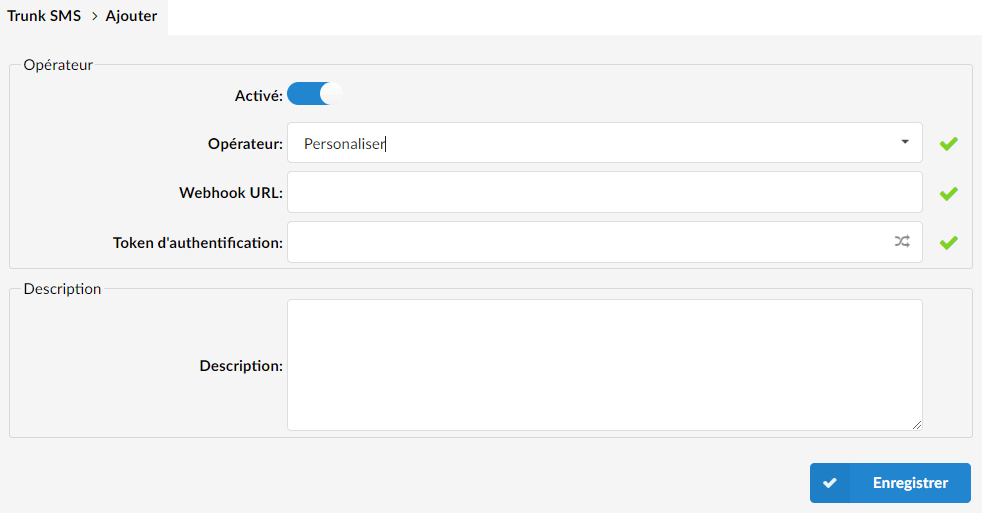
Once all fields are correctly filled in, click Save to keep the changes and create your new custom network line.

Assuming the middleware application you are connecting to works as expected, from that point on, the custom SMS network lines will be used like any other provider-specific SMS network line available on PBXware.

Here are the fields that will be presented to you after selecting Custom in the field Provider:

  • Enable

Click this toggle button to enable or disable this SMS binding

  • Name

Displays the name of a Trunk

  • Provider

Displays the provider selected for this trunk. (i.e. custom)

  • Webhook URL

The address of the middleware application used to interface with the custom trunk provider to which all SMS/MMS messages will be sent.

  • Authentication token

A token used for authentication with the middleware application. Enter the existing token or generate a new token by pressing the icon at the far right of the field.

Operation

Sending messages

The PBXware SMS service will send SMS messages to the Webhook URL defined as a POST request.

POST {webhook_url} Content-Type: application/json Authorization: Bearer {auth_token} { "from": "string", // Sender's phone number "to": "string", // Recipient's phone number "text": "string", // Message content "media_urls": ["string"] // List of URLs for multimedia attachments (MMS) }

The SMS gateway listening on the Webhook can then retrieve the information from the JSON body and send a request to any SMS provider.

The SMS gateway must return a response as a JSON object in the following format:

// case when sending the SMS was successful { "status": "success", "message": "" } // case when sending the SMS was unsuccessful { "status": "error", "message": "an error occured while sending the MMS" // an error message explaining why sending failed }

Message reception

The PBXware SMS service receives SMS messages as a POST request in the following format:

POST /smsservice/connector Content-Type: application/json Authorization: Bearer {auth_token} { "from": "string", // Sender's phone number "to": "string", // Recipient's phone number "text": "string", // Message content "media_urls": ["string"] // List of URLs for multimedia attachments (MMS) } 

Response statuses:

  • 200 OK: SMS received successfully.
  • 401 Unauthorized: the authorization header was missing or the authentication token is invalid.
  • 500: Internal Server Error: more information about the error must be provided in the response.

Examples

Reception of messages from PBXware's SMS service

from flask import Flask, request, jsonify app = Flask(__name__) def send_message_to_provider(message_data): # The implementation of this function should be replaced with the actual # implementation of sending the message_data to another provider # For example, printing the received message data print("Message received:", message_data) return {"status": "success", "message": "Message sent successfully"} @app.route('/messages', methods=['POST']) def messages(): try: # Ensure the request has a JSON content type if request.headers['Content-Type'] != 'application/json': return jsonify({"status": "error", "message": "Invalid content type"}), 400 # Parse the JSON data from the request body message_data = request.get_json() # Call the function to send the message to the provider result = send_message_to_provider(message_data) return jsonify(result) except Exception as e: # Handle any exceptions that might occur during processing return jsonify({"status": "error", "message": str(e)}), 500 if __name__ == '__main__': # Run the server on localhost:5000 app.run(debug=True)

Sending messages to the PBXware SMS service

from flask import Flask, request, jsonify import requests app = Flask(__name__) def parse_provider_request(): try: # Ensure the request has a JSON content type if request.headers['Content-Type'] != 'application/json': raise ValueError("Invalid content type") # Parse the JSON data from the provider's request body provider_message_data = request.get_json() # Create a new JSON in the specified format formatted_message = { "from": provider_message_data.get("sender_number", ""), "to": provider_message_data.get("recipient_number", ""), "text": provider_message_data.get("message_content", ""), "media_urls": provider_message_data.get("media_urls", []) } return formatted_message except Exception as e: raise ValueError(f"Error parsing provider request: {str(e)}") @app.route('/messages', methods=['POST']) def messages(): try: # Parse the provider's request using the function formatted_message = parse_provider_request() # Set up the headers for the outgoing request to my.pbxware.com/smsservice/connector headers = { 'Authorization': 'Bearer YOUR_AUTH_TOKEN', # Replace with your actual Auth Token 'Content-Type': 'application/json' } # Send the message to the my.pbxware.com/smsservice/connector endpoint response = requests.post('https://my.pbxware.com/smsservice/connector', json=formatted_message, headers=headers) # Check if the request was successful (HTTP status code 2xx) if response.ok: return jsonify({"status": "success", "message": "Message sent successfully"}) else: return jsonify({"status": "error", "message": f"Failed to send message. Error: {response.text}"}), response.status_code except ValueError as ve: # Handle parsing errors return jsonify({"status": "error", "message": str(ve)}), 400 except Exception as e: # Handle any other exceptions that might occur during processing return jsonify({"status": "error", "message": str(e)}), 500 if __name__ == '__main__': # Run the server on localhost:5001 app.run(debug=True, port=5001)

Gateway between two PBXware SMS services

# This Python script serves as an SMS proxy/gateway designed to facilitate communication # between two PBXWare instances. The application acts as an intermediary for sending and # receiving SMS messages, forwarding them from one PBXWare instance to another. # # Purpose: # - Act as an SMS bridge between PBXWare instances, allowing seamless communication. # - Handle incoming POST requests to the '/messages' endpoint, validating Bearer # Authorization with the provided token, printing the received JSON payload, and # forwarding the message to the specified PBXWare instance. # - Return a JSON response with status and message fields based on the success or failure # of the forwarding operation, utilizing the response from the receiving PBXWare instance. # # Command-Line Arguments: # --listen: Specifies the host and port for the HTTP server to listen on. # Example: --listen 127.0.0.1:5000 # # --forward-to: Specifies the URL where incoming SMS messages will be forwarded. # Example: --forward-to https://my.pbxware.com/smsservice/connector # # --auth-token: Specifies the token for Bearer Authorization, ensuring secure communication. # Example: --auth-token my_secret_token # # Example Usage: # python sms_proxy.py --listen 127.0.0.1:5000 --forward-to https://my.pbxware.com/smsservice/connector --auth-token my_secret_token # # Note: This script serves as an illustrative example and may need modification to suit # specific requirements or environments. import argparse import json from flask import Flask, request, abort, jsonify import requests app = Flask(__name__) def parse_args(): parser = argparse.ArgumentParser(description="HTTP Server with Forwarding") parser.add_argument("--listen", required=True, help="Host and port for HTTP server") parser.add_argument("--forward-to", required=True, help="URL where requests will be forwarded to") parser.add_argument("--auth-token", required=True, help="Token for Bearer Authorization") return parser.parse_args() def validate_auth_token(request): auth_header = request.headers.get('Authorization') if not auth_header or auth_header != f'Bearer {args.auth_token}': abort(401, 'Unauthorized') def forward_request(url, data, auth_token): headers = {'Content-Type': 'application/json', 'Authorization': f'Bearer {auth_token}'} response = requests.post(url, data=json.dumps(data), headers=headers) return response @app.route('/messages', methods=['POST']) def receive_message(): try: validate_auth_token(request) data = request.json print("Received Message:") print(json.dumps(data, indent=2)) forward_response = forward_request(args.forward_to, data, args.auth_token) if forward_response.status_code == 200: return jsonify({"status": "success", "message": ""}), 200 else: return jsonify({"status": "error", "message": f"Forwarding failed with status code {forward_response.status_code}"}), 200 except Exception as e: return jsonify({"status": "error", "message": str(e)}), 500 if __name__ == '__main__': args = parse_args() host, port = args.listen.split(':') app.run(host=host, port=int(port))
Share

SMS connector

Or copy the link below

CONTENT