



TUTORIAL: Change your outgoing caller ID
Changing your outgoing caller ID allows you to control the identification shown to the recipient during a call. This guide explains how to configure and use the various caller ID options available, depending on your needs (local calls, emergency calls or outgoing calls via a Trunk).

Go to the extension enhanced services > Caller ID of the desired extension to begin configuring your Caller ID.
1. Caller ID for local calls
- Fill in the field System/Caller ID with a default identification (for example, “John 101”).
- When this extension makes an internal call, the recipient will see this caller ID displayed on their phone.

2. Emergency caller ID
- Fill in the field Emergency caller ID.
- This identification will be used automatically for calls to emergency services.
- Make sure to use a valid and identifiable number to comply with local standards.

3. Caller ID list
- Go to the Caller ID allowed list section.
- Add multiple caller IDs with a short code along with their number and a descriptive label (for example: 0601020304 / “Perso1”)
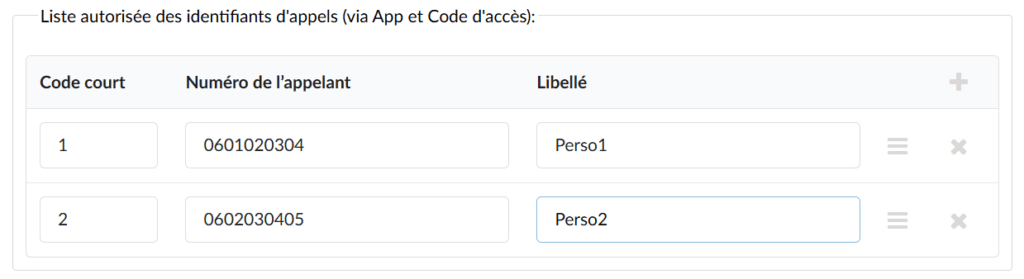
This list will be available for:
- Communicator: Users will be able to choose a caller ID from a drop-down menu before making a call.
- Access code (*65): Users will dial the following format to choose a specific identification.
*65*ID*NUMBER
To display the outgoing number 0610203040 and the 0990807060 with this number, you will then need to dial:
*65*0610203040*0990807060
Short codes
- Define a Short code for each caller ID. This simplifies the selection process.
Example:
- Short code: 1
- Associated identification: 0601020304
To make a call using this short code, dial:
*6510990807060
For other short codes, dial these numbers as follows:
*6520990807060
*6530990807060
*6540990807060
…
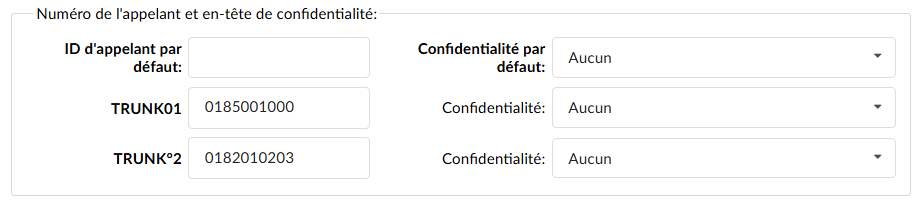
4. Trunk caller IDs
You can set a specific outgoing number for each trunk assigned to your tenant/server.
5. Best practices
- Comply with local regulations: Make sure that the caller ID numbers used are valid and compliant with regulatory standards.
- Check your configurations: Test each configuration to ensure that the IDs work as expected.
- Memorize the important short codes: This makes them easier to use for frequent calls.
