



TUTORIAL: Configure the DND service on a phone
Yealink phones can be auto-provisioned with this setting by adding these lines of code in the “General user agent auto-provisioning template” of the extension or the UAD.
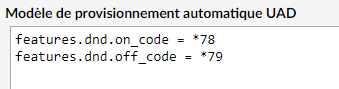
You can find these settings in the phone interface in Features > Forward & DND > DND
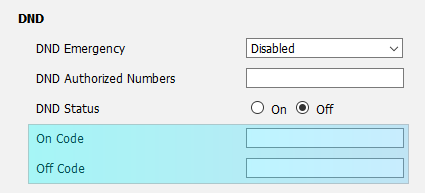
Fanvil
Here is a configuration block for Fanvil phones where you will need to inject these parameters into the phones:
Fanvil phones can be auto-provisioned with this setting by adding these lines of code in the “General user agent auto-provisioning template” of the extension or the UAD.
You can find these settings in the phone interface at Line > Advanced settings
Use Feature Code checked
Enable DND: *78
DND Disabled: *79
Enable DND: *78
DND Disabled: *79

