



FR EN

TUTORIAL: Synchronize the LDAP directory on HTEK, Fanvil phones

Estimated reading: 4 minutes

The PBXware enterprise directory (see TUTORIAL: Company directory) works and provides basic auto-provisioning for Yealink, Polycom and Cisco branded phones, but the HTEK and FANVIL templates do not, for the moment, include these settings.

The configurations should be added in the field UAD auto provisioning template the extensions to which you want to synchronize the directory:
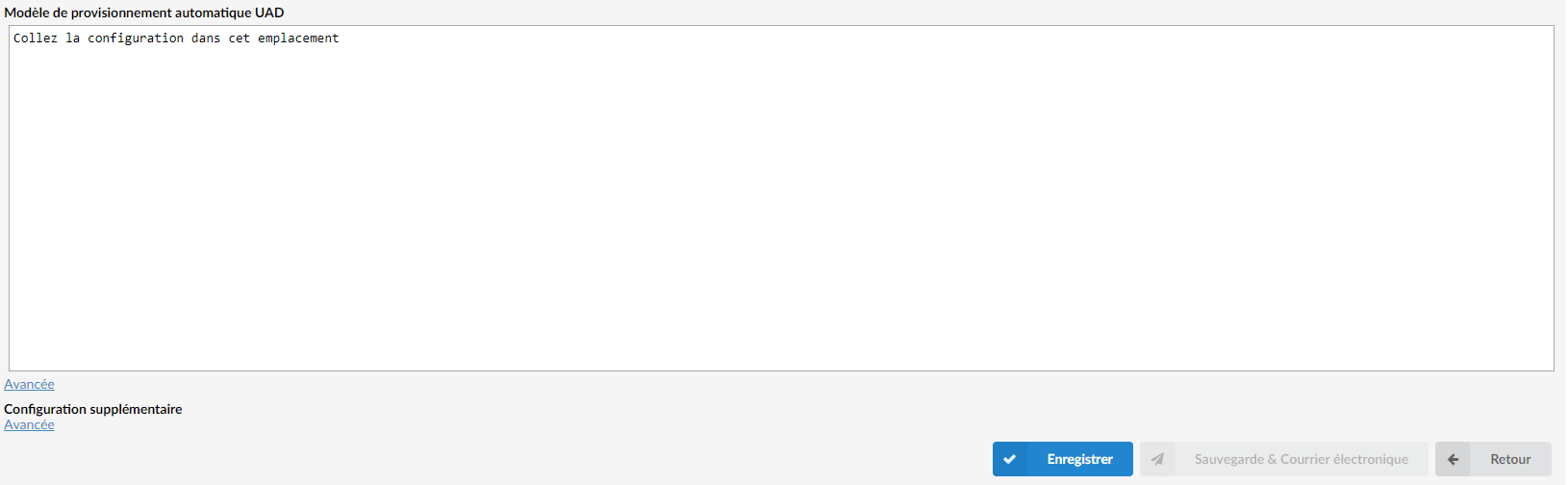
Enable the LDAP server

In order to enable company directory synchronization, you must have first enabled LDAP on PBXware. To do so, go to: 

  • Business/Call-Center versions:

Settings > Server > LDAP

  • Multi-Tenant version:

Settings > Tenants > Choose your tenant > LDAP
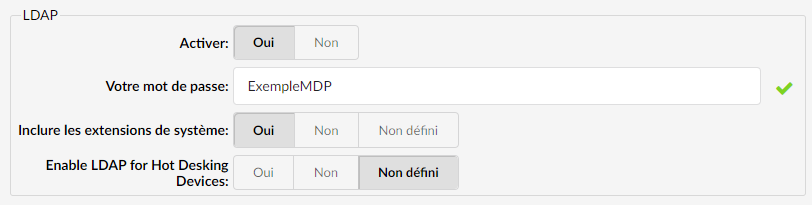
Set the option Enable on Yes, and set an LDAP password that will be used afterward. 

If you want to include the extensions created directly in the LDAP directory, enable the option "Include system extensions” on Yes

HTEK phones

 P5430=(cn=%) P5431=(pn=%) P5432=AdresseDuServeurLDAP P5433=11389 P5434=Adresse_MAC_du_téléphone (exemple : 0c383e43dbcb) P5435=Adresse_MAC_du_téléphone (exemple : 0c383e43dbcb) P5436=Mot_de_passe_LDAP P5437=50 P23136=cn P23137=pn P5440=%cn P5442=0 P5441=1 P5443=1 P5444=>1


FANVIL phones

Depending on the structure of the template used by PBXWare for this phone, which you can check at the address http://pbxware-exemple.fr/prov/adresseMAC.cfg (connection with your provisioning logins), or go to your phone's configuration and export the configuration in .txt format. 

Then choose one of the provisioning template structures below: 

 phone.ldap.1.Title = Contacts phone.ldap.1.Server = AdresseDuServeurLDAP phone.ldap.1.port = 11389 phone.ldap.1.Base = Adresse_MAC_du_téléphone phone.ldap.1.UseSSL = 0 phone.ldap.1.Version = 3 phone.ldap.1.CallingLine = -1 phone.ldap.1.InCallSearchEnabled = 1 phone.ldap.1.OutCallSearchEnabled = 1 phone.ldap.1.Anonymous = phone.ldap.1.Authenticate = 3 phone.ldap.1.Username = Adresse_MAC_Du_Tel (exemple : 0c383e43dbcb) phone.ldap.1.Password = LDAP_Password phone.ldap.1.TelAttr = pn phone.ldap.1.MobileAttr = mobile phone.ldap.1.OtherAttr = other phone.ldap.1.NameAttr = cn phone.ldap.1.SortAttr = cn phone.ldap.1.Displayname = cn phone.ldap.1.NumberFilter = (pn=%) phone.ldap.1.NameFilter = (cn=%) phone.ldap.1.MaxHits = 50 phone.LDAPSearch = 1

Other provisioning template format:

<PHONE FEATURE MODULE> --LDAP Config-- : LDAP1 Title :Contacts LDAP1 Server :AdresseDuServeurLDAP LDAP1 port :11389 LDAP1 Base :Adresse_MAC_du_téléphone (exemple : 0c383e43dbcb) LDAP1 Use SSL :0 LDAP1 Version :3 LDAP1 Calling Line :-1 LDAP1 Bind Line :-1 LDAP1 In Call Search :1 LDAP1 Out Call Search :1 LDAP1 Authenticate :3 LDAP1 Username :Adresse_MAC_du_téléphone (exemple : 0c383e43dbcb) LDAP1 Password :LDAP_Password LDAP1 Tel Attr :pn LDAP1 Mobile Attr :mobile LDAP1 Other Attr :other LDAP1 Name Attr :cn LDAP1 Sort Attr :cn LDAP1 Displayname :cn LDAP1 Number Filter :(pn=%) LDAP1 Name Filter :(cn=%) LDAP1 Max Hits :50

SNOM phones

ldap_server$ :adresse.serveur.ldap (votre PBX) ldap_port$ :11389 ldap_base$ :Adresse_MAC_Du_Tel (exemple:0c383e43dbcb) ldap_username$ :Adresse_MAC_Du_Tel (exemple:0c383e43dbcb) ldap_password$ :MDP_LDAP guess_max_hits$ :50 ldap_sort_mode$ :none ldap_search_filter$ :(cn=%) ldap_number_filter$ :(pn=%) ldap_search_filter_during_call$ :(cn=%) ldap_number_filter_during_call$ :(pn=%) ldap_name_attributes$ :cn ldap_number_attributes$ :pn ldap_display_name$ :cn

Adding a speed dial key

To provision the replacement of the "Contacts” of Fanvil phones through the LDAP directory directly:
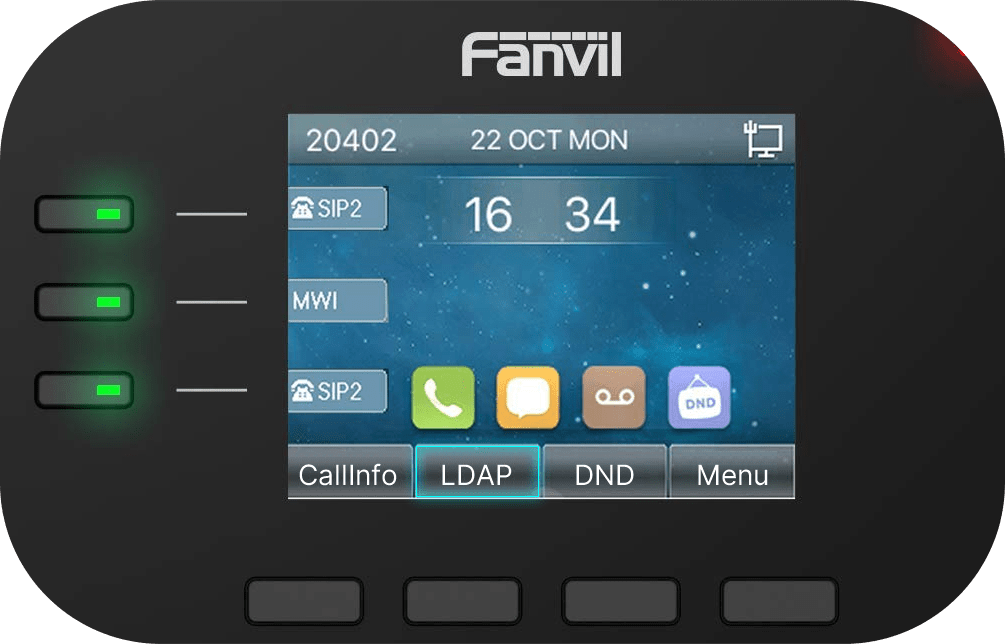
Add this provisioning configuration to the extension:

<PHONE FEATURE MODULE> --Softkey Config-- : Desktop Softkey :history;dss1;dnd;menu; <DSSKEY CONFIG MODULE> --SoftDss Config-- : Fkey1 Type :3 Fkey1 Value :F_LDAPCONTACTS:0 Fkey1 Title :LDAP Fkey1 ICON :Green
Share

TUTORIAL: Synchronize the LDAP directory on HTEK, Fanvil phones

Or copy the link below

CONTENT