



Communicator Web: Unsupported codec, media format or other network related issue
When you make a call from Communicator Web without having configured PBXware for this purpose, an error pop-up:

Thus, certain prerequisites must be met:
- Enable the TLS protocol
- Enable WebRTC on the extension
Enable the TLS protocol
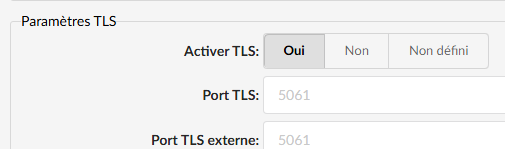
The TLS protocol must be enabled on the system in order to communicate via the WebRTC protocol. To do this, go to Settings > Protocols > SIP > TLS settings > Enable TLS > Yes (place yourself in the Master-tenant) then Restart the PBXware service with the button located in the top right.
Enable WebRTC
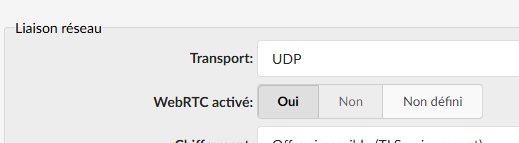
The extension must have enabled the WebRTC and the codec Opus on their system or on themselves.
To do this, navigate to the relevant extension Extension > Show advanced options > Network binding > Enable WebRTC > Yes
Check device permissions
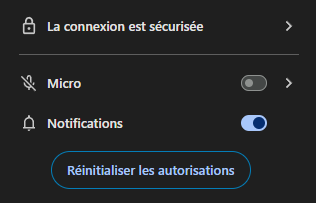
Finally, make sure the audio devices are properly authorized by the browser to be used by the Communicator Web application:
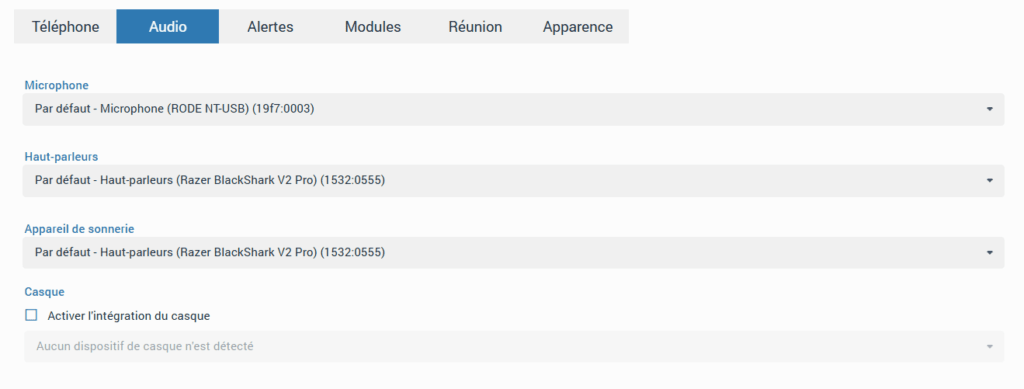
In Preferences > Audio, check that the selected devices appear correctly and are the right ones:
With these settings, you can now make your calls via Communicator web.
