Symptoms:
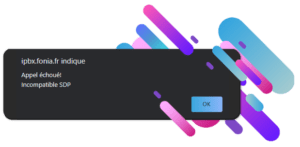
When you make a call from Communicator Web, an error pop-up will appear displaying the following:
Resolution:
Before making a call with Communicator Web, certain prerequisites must be met:
- Enable WebRTC on the extension
- Enable the Opus codec on the extension
- Enable TLS in the protocols
The extension must have enabled the WebRTC and the codec Opus on their system or on themselves.
To do this, simply navigate to the relevant extension Extension > Show advanced options > Enable WebRTC > Yes
For the Opus codec, it must be enabled in the extension as well(if it does not appear, check that it is present in Settings > Servers > Default codecs > Remote > Opus.
On a Multi-Tenant system, select the Tenant in question in Settings > Tenants > Default codecs > Remote > Opus).
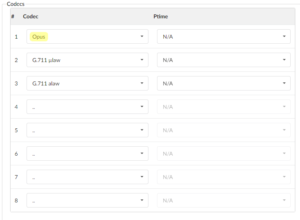
Then in the extension, Extension > Show advanced options > Codecs and place Opus in the list.
Similarly, the settings TLS must be enabled on the system. To do this, simply go to Settings > Protocols > SIP > TLS settings > Enable TLS > Yes > Restart the PBXware service using the button in the top right corner.
An additional parameter is required for the meeting feature and Communicator WEB on a PBXware behind a NAT:
In Settings > Protocols > RTP > Additional configuration:
[ice_host_candidates]
local_address => public_ip
For example:
[ice_host_candidates] 192.168.1.62 => 195.154.138.62
Save the settings.
If all the above settings have been applied, calls on Communicator web will work.