



FR EN

Introduction

Estimated reading: 4 minutes

Communication protocol

The PBXware APIs work over the HTTP (Hypertext Transfer Protocol) protocol. It uses only the GET and POST methods to send and receive data between third-party applications and PBXware.

Authentication

To ensure security, APIs use a unique API key for each user or third-party application. This key is essential for authenticating requests sent to PBXware.

For POST and GET requests, authentication is done via "API Key":

the "Key" field will show "apikey"

the key in the format "6vs6gwd6fv6x84…" will be in the "Value" field.

By default, the API key is not set. However, you can create one in the PBXware admin settings.
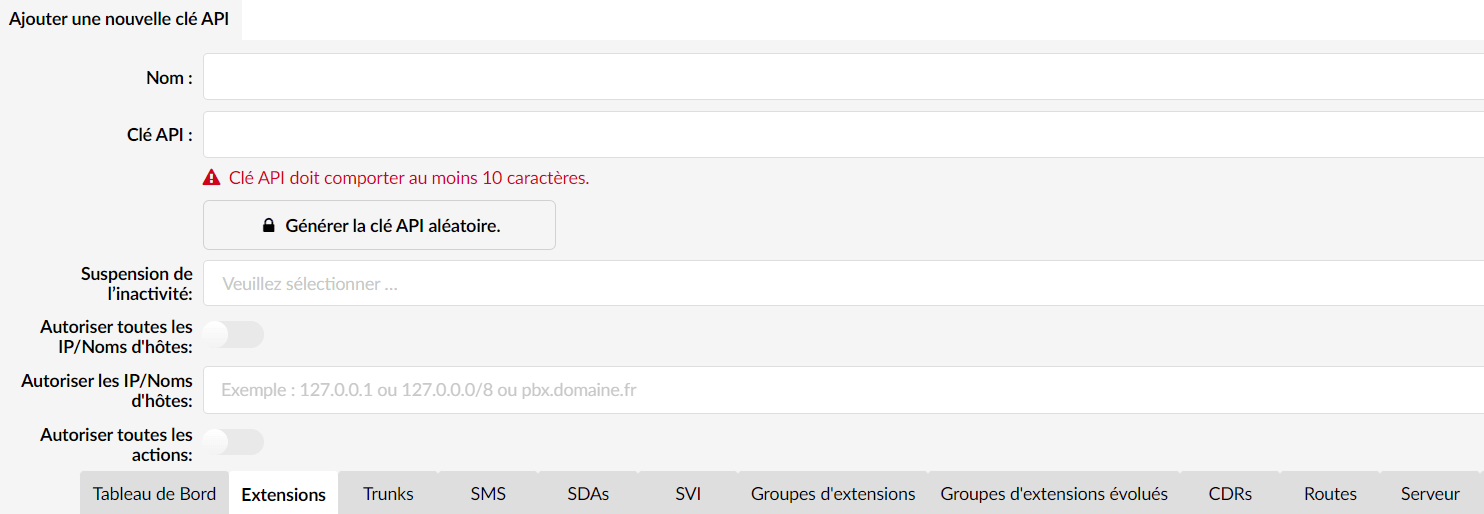
The API key must have a minimum size of 32 random characters. It is also possible to generate a random key directly from the PBXware interface.

On PBXware, it is possible to place restrictions (ACL) on the features that the APIs can access.

It is crucial to keep the API key secret, as it gives access to sensitive features, such as data deletion, to third parties.

Requests

Requests to the PBXware APIs contain several elements, including the API key and the desired action. For example, to retrieve the list of DID (Direct Inward Dialing) numbers, the request would look like this:

GET /?apikey=votre.clé.api&action=pbxware.did.list HTTP/1.0 Host: pbxware.local User-Agent: Mozilla/5.0

GET https://[PBXware name].bicomsystems.fr/?action=pbxware.did.list&server=2&ext=100&apikey=[secret API key]

In this example, "pbxware.did.list" is the requested action, which retrieves the list of DID numbers from PBXware.

GET = this is the request to retrieve the desired information.

https://[PBX name].bicomsystems.fr/ = in https you enter the IP or the URL of the PBX

?action= we start by saying that we are going to perform an action

pbxware. = the beginning of every command before specifying the action.

.did.list = did for DID and list to get the list of DIDs available on this PBXware.

& = this is to add information needed for your search, as here the PBX is a multi-tenant and therefore you must indicate the tenant number or server = 2 because "1 is reserved for the master".

The search can then be refined based on the extension or trunk, etc… See the possible arguments per action in the list below.

apikey= and finally we end with the Key (API key).

The order of the action and the apikey is not fixed; you can put the api key before the action and vice versa.

so in summary we make a request on server 2 and for extension 100 of the list of DIDs assigned to it.

Replies

The responses from the PBXware API are generally returned in JSON format (JavaScript Object Notation), a lightweight and easily readable data format. Here is an example of a JSON response:

json: 

{ "7": {
"number": "12345",
"number2": "",
"server": "7",
"trunk": "6099",
"type": "Extension",
"ext": "530",
"status": "enabled" } "8": {
"number": "12346",
"number2": "",
"server": "7",
"trunk": "6099",
"type": "Extension",
"ext": "100",
"status": "enabled" }
}

This response contains information about the DID numbers available in the PBXware system.

Response formats

The PBXware API supports several response formats, including JSON and PHP (serialized).

To test the API, several command-line tools are available, such as curl (https://curl.se/), httpie (https://httpie.io/docs/cli/scripting) and curlish (https://pythonhosted.org/curlish/). Here is an example of using httpie to query the API:

http -b "http://votre.ipbx.fr/?apikey=votre.clé.api&action=pbxware.ext.list"

Error Handling

In the event of an error, the API response will contain an “error” key indicating the nature of the error. Any subsequent operation must be interrupted if an error is detected.

see a comprehensive list here: https://restfulapi.net/http-status-codes/

otherwise the most common are: 

200 OK; 302 Found; 400 Bad Request; 401 Unauthorized; 403 Forbidden…etc…

API actions

The main argument that controls the API is the "action" argument. It is structured in three parts: application.object.method

In the case of PBXware, the application is always "pbxware".

application= pbxware (and nothing else)

.object = see exhaustive list of objects

.method = see the possible methods under the objects

required argument = depending on the method and the type of PBXware. (i.e.: &server=2)

By understanding these fundamental principles, developers can begin to create custom applications and integrations that take full advantage of PBXware's features.

Share

Introduction

Or copy the link below

CONTENT