



Global view
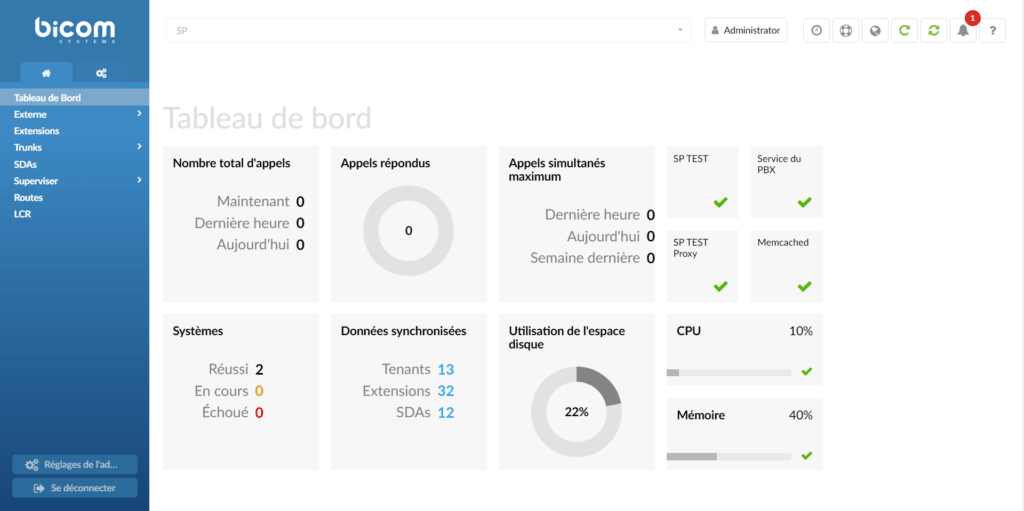
Dashboard
The PBXware SP dashboard is a visual display of the most important PBXware indicators:
- Calls
- SIP registrations
- Synchronized data
- Licenses
- Hardware usage
- PBXware menu
The PBXware SP menu is located on the left and displays all available administration sections, separated into three tabs:
- Home
- Settings
The Logout button and the administration settings are located at the bottom of the left navigation menu, allowing you to modify various system settings in PBXware.
- Action menu


The action menu at the top right allows you to:
- Change the password
- Set up 2-step verification
- Change language
- Reload PBXware
- Restart PBXware
Standard and advanced options
PBXware was designed with simplicity and extensive configuration options as its main objectives. The administration provides standard and advanced modes in every section to achieve both of these goals.
- Standard Options
Standard mode is designed to allow a simple and intuitive administration method, since the level of configuration knowledge required is based on common information fields (name, email address, etc.). This is possible because PBXware uses a powerful template system that preconfigures all the advanced options, leaving only the common information values to be entered.
- Advanced options
In contrast, advanced mode requires a better knowledge of the system to fine-tune the system settings for various applications and uses. This manual provides detailed information on the advanced options. However, administrators must remember that thorough training and hands-on experience are necessary to effectively administer the advanced sections. For simplicity, the options available in the standard options section are not repeated in the advanced options.
