



Voicemail
Estimated reading: 1 minute
The voicemail section allows you to listen to your voicemail messages. Clicking the Voicemail icon in the navigation bar opens the voicemail screen.
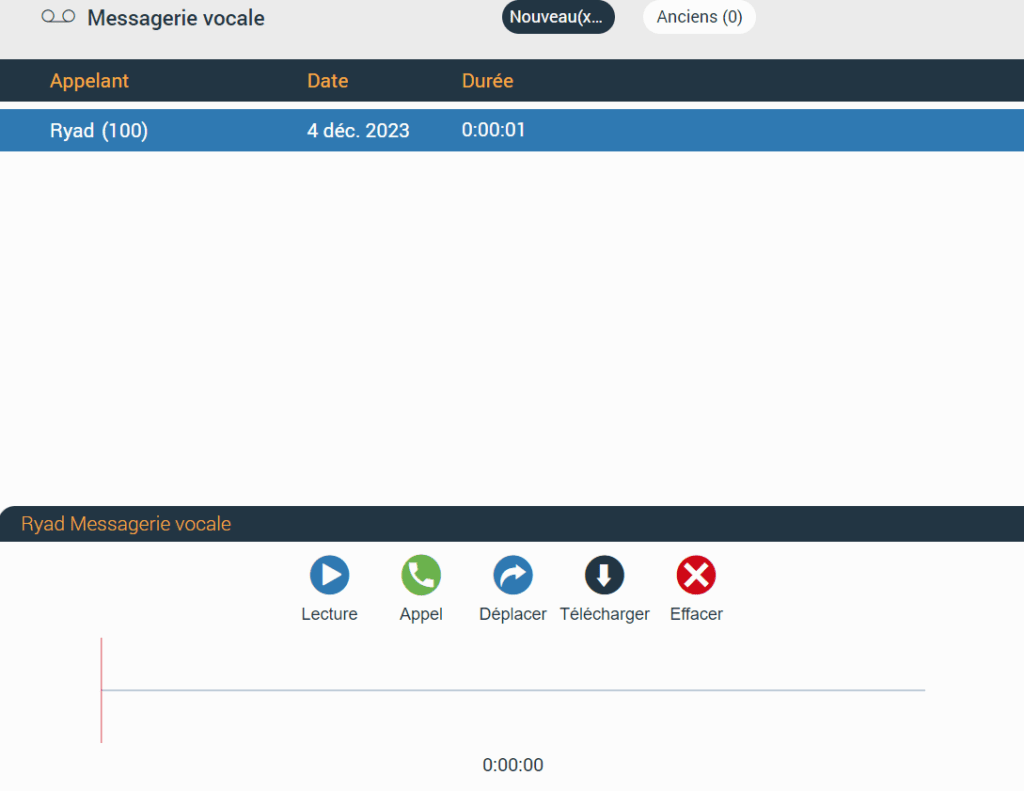
At the top of the voicemail screen is the context bar with two tabs:
- New : contains the new voicemail messages.
- Old : contains the old voicemail messages.
Below the context bar is the voicemail list with information such as:
- Caller : displays the caller's name.
- Date : displays the date on which the voicemail was received.
- Duration : displays the duration of the voicemail.
Clicking the desired voicemail offers additional options such as:
- Playback : allows you to play the voicemail.
- Call : allows you to call the person who left the voicemail.
- Move : allows you to move voicemails from the new folder to the old folder and vice versa.
- Download : allows you to download the voicemail to the computer.
- Delete : allows you to delete the voicemail.
Communicator Web supports only the .wav audio format
