



Packs
Before you can create your first tenant, you must first assign user quantities to this tenant. Packs have been specially designed for this purpose, so that you can size your offering.
Introduction
Packs are bundles used to determine the quantities you want allocated to your tenants among the following: extensions, voicemails, queues, IVRs, conferences and ring groups.
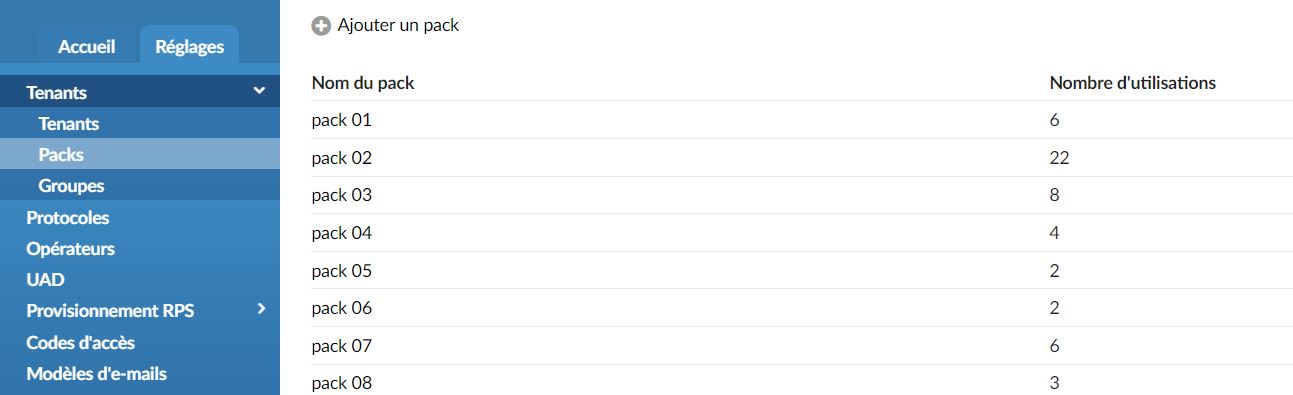
Go to the Master-Tenant then to Settings > Tenants > Packs
- Pack name
Give your pack a name.
- Number of uses
Number of tenants using a plan.
Add/Edit a pack
General
- Name
Name of your pack
- Extensions
Number of extensions that can be created on a tenant using this pack.
- Voice messages
Number of voicemails that can be created on a tenant using this pack.
- Queues
Number of queues that can be created on a tenant using this package.
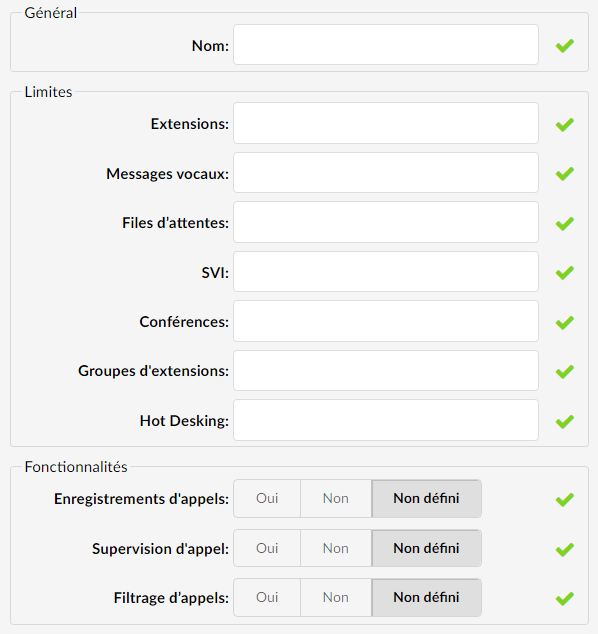
- IVR (Interactive Voice Response)
Number of IVRs that can be created on a tenant using this package.
- Conferences
Number of conferences that can be created on a tenant using this package.
- Extension groups
Number of ring groups that can be created on a tenant using this package.
- Hot-desking
Number of hot desking devices that can be created on a tenant using this package.
Features
- Call recordings
Choose whether to enable or disable call recordings on the tenant using this package. If you disable it, you will not be able to record the call at the extension and DID level. Options such as instant recording, delete recording and listen to recordings in enhanced services will be disabled for all extensions, in case you have set call recordings to No.
- Call supervision
Enabling or disabling this option will allow or prohibit the use of the call monitoring option in enhanced services for all extensions.
- Call filtering
If you enable this option, the Call Screening option under Enhanced Services will be listed. The user will have the ability to enable or disable this option. Setting the Call Screening option to No will not display this option in the enhanced services.
