




DID

A DID, or Direct Inward Dialing, is an essential element in the field of telecommunications and telephone systems such as PBXware.
It offers a fundamental functionality that allows incoming calls to be directed to specific destinations within an organization, thereby providing valuable flexibility for call management and the optimization of internal communication.
In this article, we will explore in detail what a DID is, how it works within a PBXware system, and how it can improve the efficiency of communications within your company.
DIDs are used to direct all incoming calls (which come through trunks) to specific system destinations. Go to Home > DIDs (on a Multi-Tenant system, you must position yourself on the Master-Tenant).
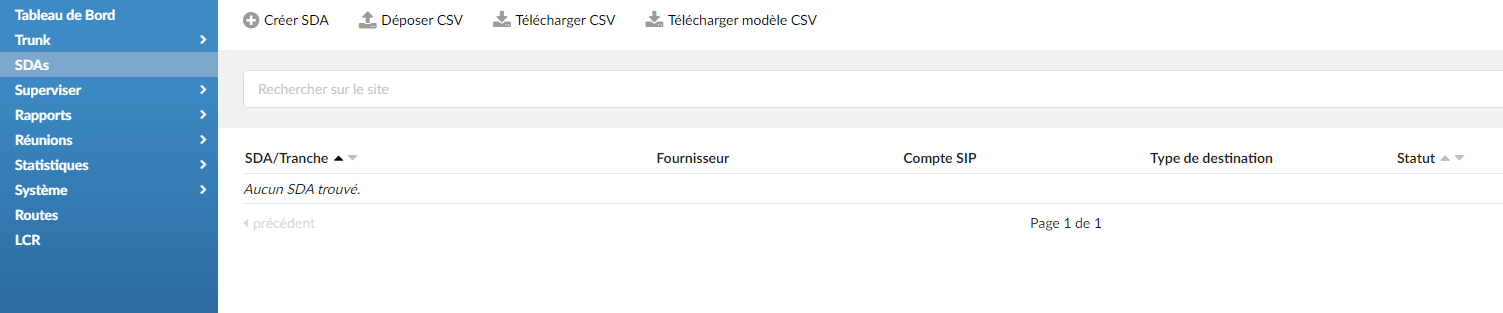
Click on Create a DID.
Add and edit a DID
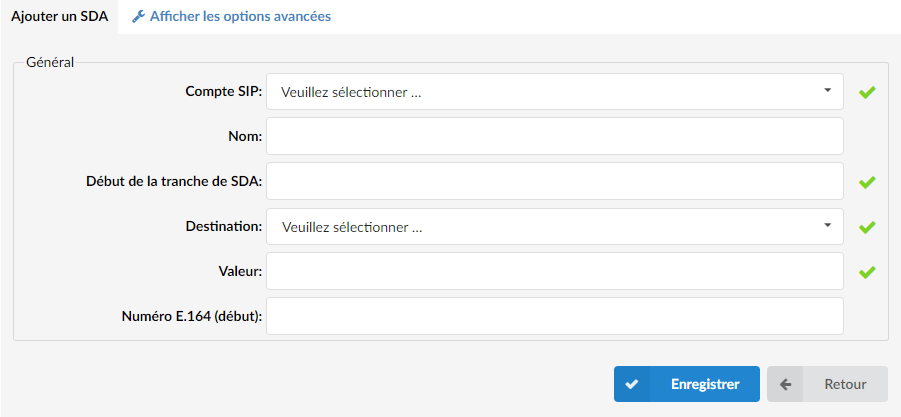
Fill in the following fields:
SIP account (Trunk)
Select the trunk from which the DID will take calls.
Name
Enter the name of a DID
DID range start
Enter your DID number here
Destination
PBXware destination to which the DID will forward all calls.
Value
Destination value to which all DID calls will be forwarded.
(For example, if 'Destination'='Extension', set the extension number here (for example, 1002). In case 'Destination'='IVR', set the IVR extension number here).
E.164 number
Enter your DID number in E164 format. For example, if your DID number is 09 80 50 60 70 and you live in France, your E.164 number is 33980506070.
IMPORTANT NOTE:
On a Multi-Tenant system, an additional "Tenant" field must be filled in. This will be used to assign your DID to a tenant.

