



12. Geo-redundancy
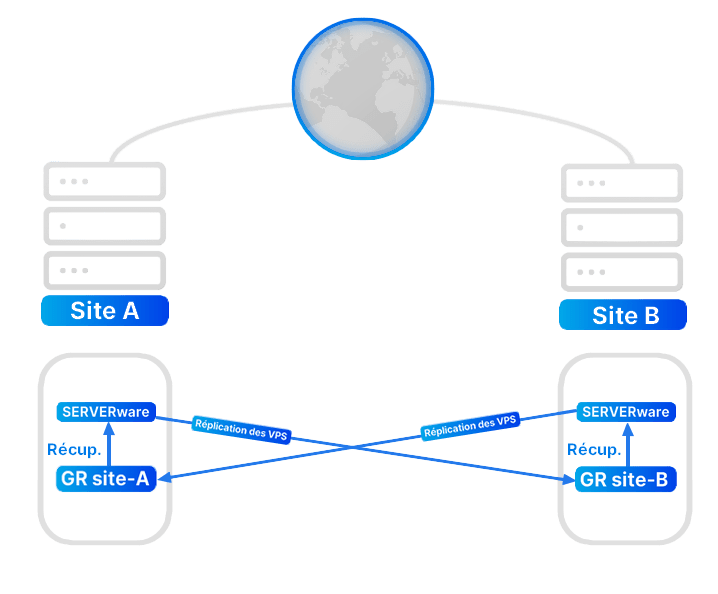
Once GRS (Geo-Redundancy Server) is connected to SERVERware, it can be used for two main functions. One is to configure replication on this server, and the other is to browse/list existing replications with the ability to select and resume VPS.
Summary of properties:
- Incremental replications
- Retaining multiple replication cycles over time at the GRS
- Takeover from multiple points in time
- Data synchronization separate from the active services on the recovery site and not affecting the active services
- Add one or more GRSs
- Monitor each GRS status
- Monitor recent replications
- Flexibility in combinations for cross-site replication
- The site can be replicated to one or more destination sites
- One or more sites can be replicated to a destination
- Different VPS can be replicated to different remote sites
- Connect to the remote GRS by specifying its IP address and secret API key
- Control the bandwidth and storage I/O used by GRS
Configure the replication cycle:
- Select the SERVERware partitions and the VPS to replicate
- Select the replication cycle; the minimum is one minute
- Specify the number of recovery points to keep
- Control the bandwidth and storage I/O used by GRS
- Specify the alternative IP address of the VPS (IP to use after the takeover on the remote site if it is different)
- Monitor the progress and completion status of each cycle and VPS replicated in that cycle
Browse and resume from GRS:
- Multiple sites can be replicated
- Select the source site and the VPS to take over
- Choose the most recent or the oldest recovery point, in case the most recent contains unwanted data
- Choose the destination partition
- Choose the destination host
- Save the template for a quick takeover in case of a disaster
Monitor GRS resources:
- Using the CLI administration interface, the administrator can allocate and control multiple sites on a single GRS
- Limit storage
- Limit bandwidth
- Manage the access control list
