



1. Deployment guide
The topology of SERVERware Standalone Edition is presented in the following image:
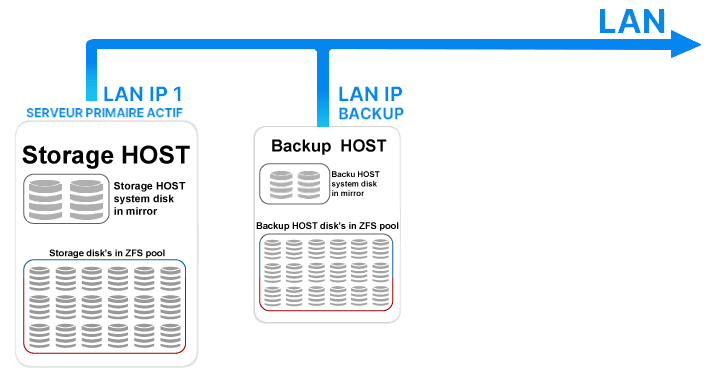
The following guide describes the minimum and recommended hardware requirements, as well as the procedures for a successful deployment of SERVERware Standalone.
Requirements for the storage controller/server
| Minimum requirements | Recommended configuration | |
|---|---|---|
| Processor (CPU) | Intel Quad-Core 2.0 GHz processor with 8 MB cache memory | Intel Xeon Quad-Core 2.4 GHz processor with 12 MB cache memory |
| Memory (RAM) | 16 GB | 32 GB |
| Network | 1 network interface | 1 network interface |
| Hard Drive | 1 x SSD Drive of 64 GB (for the system), 2 x SSD Drives of 500 GB (for storage) | 1 x SSD Drive of 64 GB (for the system), 4 x SSD Drives of 250 GB (for storage) |
Requirements for a backup server
| Minimum requirements | Recommended configuration | |
|---|---|---|
| Processor (CPU) | Intel Quad-Core 2.0 GHz processor with 8 MB cache memory | Intel Xeon Quad-Core 2.4 GHz processor with 12 MB cache memory |
| Memory (RAM) | 16 GB | 32 GB |
| Network | 1 network interface | 2 network interfaces |
| Storage | 1 x Hard Drive of 1 TB (for the system and backup) | 1 x SSD Drive of 64 GB (for the system), 6 x Hard Drives of 1 TB (for backup) (RAID10) |
WARNING:
Software RAID implementations (including the motherboard) are not supported and could cause potential problems that Bicom Systems would not be able to support.
- Importance of a functioning RAID battery
- Importance of a UPS and dual power supply
KVM access
- Support for remote power management (remote reset/power off/power on)
- Remote BIOS access
- Remote SSH console access
- A public IP assigned to KVM
- If the KVM system is behind a firewall/NAT, the following ports must be opened: TCP (80, 443, 5100, 5900-5999)
Installation media
- DVD image burned onto a DVD and inserted into a DVD drive
- USB image burned onto a 2 GB USB drive and inserted into the working USB port
Network configuration
Please refer to this page for more information about the network configuration under SERVERware.
Storage configuration
Thanks to the ZFS file system, hardware RAID is not required. However, if a RAID controller is present and you wish to use it, the presence of a battery and write cache is essential. Any hardware RAID without a backup battery and without write cache enabled cannot be supported. “Fake RAID” is not supported, must not be used, and should be disabled if it is supported by the motherboard. “Fake RAID” is essentially a software RAID provided by the motherboard BIOS.
Suppose we have two storage disks per server (the disks must be identical). Currently, the configuration wizard will form the following pool:
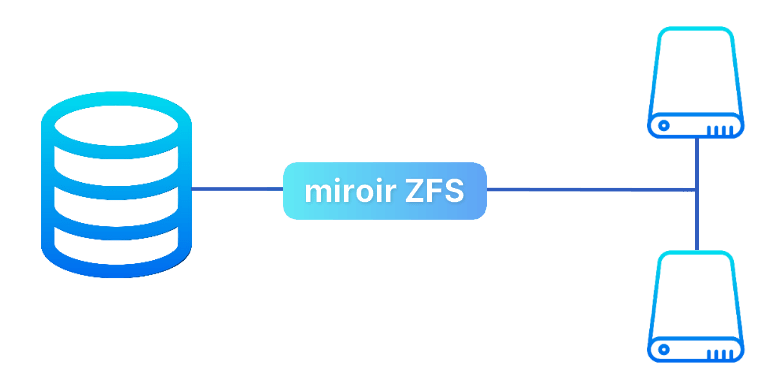
- If the use of hardware RAID cannot be avoided due to JBOD mode, please configure RAID 0 for each disk.
Creating installation media
To create a USB installation medium, please follow the instructions and download the necessary images from the following procedures page:
