



Chatbots
The Chatbots section functions as an advanced routing system designed to guide customers to the queue best suited to their specific needs. Unlike conventional chatbots that automatically respond to customer requests, these specialized chatbots allow customers to choose the queue composed of the agents most qualified to help them resolve their particular issue.
This highly targeted approach to customer routing not only amplifies customer satisfaction but also allows your team to focus its expertise where it is most needed, thereby responding more effectively to complex issues.
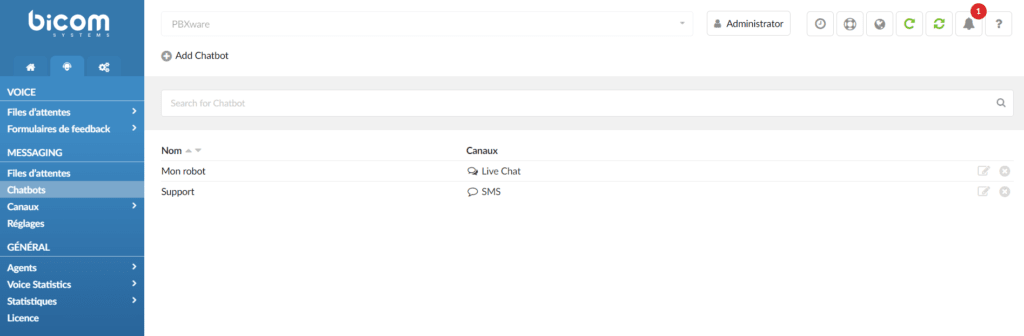
Description of the available options:
- Name
This section of the Chatbots list serves as an identifier for each individual chatbot on your system. This name is what differentiates one chatbot from another, especially if you have multiple chatbots, each assigned to specific queues or functions. Giving each chatbot a descriptive name helps you, your team, and even your customers easily distinguish the different chatbot routing options. A well-chosen name can give users an immediate idea of the type of assistance or routing they can expect from that particular chatbot. - Channel
The "Channel" column in the Chatbots list indicates the communication platforms on which each chatbot is active. Currently, this column can display channels such as "Live Chat" and "SMS", specifying where the chatbot will interact with customers. When a customer interacts with your service through one of these channels, the chatbot directs them to the appropriate queue based on their needs. Each channel can have its own dedicated chatbot, or a single chatbot can operate across multiple channels, each offering a unique set of queues most relevant to that particular communication platform. This feature improves the customer experience by ensuring they are guided to the agents best suited to their specific queries, regardless of the channel they use to contact them.
Set up a chatbot
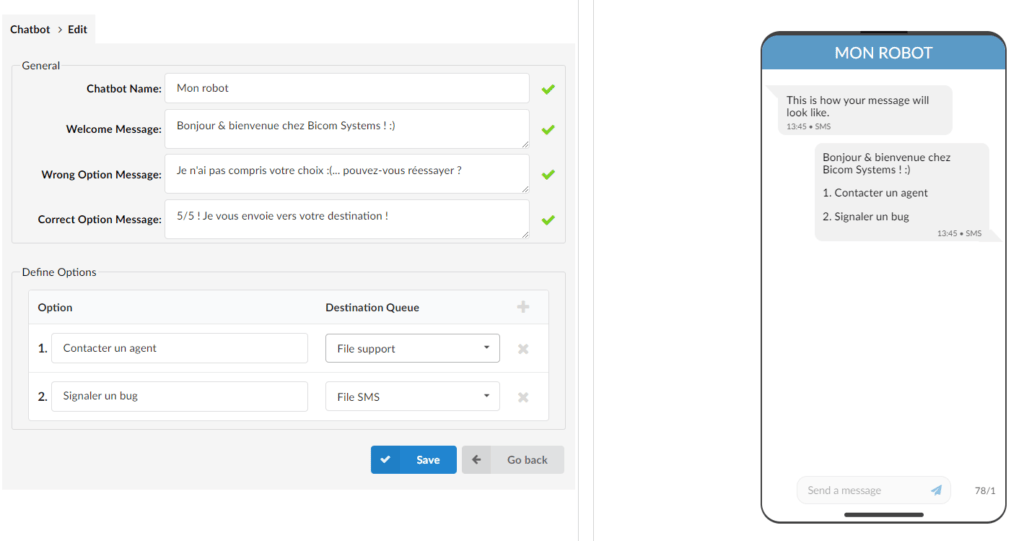
To configure a chatbot, click the “Add a chatbot” button. This will take you to a page where you can configure your chatbot's settings. There are four fields you can customize:
- Chatbot name: This is the name of your chatbot, visible to administrators in the Chatbots list for easy identification.
- Welcome message: this is the message that the chatbot will send to customers when they start a conversation with it for the first time. This message should provide a brief introduction to the chatbot and its purpose.
- Incorrect option message: this is the message that the chatbot will send to customers accessing via the SMS channel when they offer an option that is not recognized. This message should inform them that their input was not understood and provide guidance on how to proceed.
- Correct option message: this is the message that the chatbot will send to customers when they offer a recognized option. This message should confirm that the customer's input was understood and provide additional information or instructions.
- Preview: on the other side of the page, you will find a graphical preview of the Visitor application displaying the chatbot options. This provides a visual representation of how the chatbot will appear to users accessing via the SMS channel.
Options customization
Below the message fields, the user can find the section in which you can add options and a destination queue.
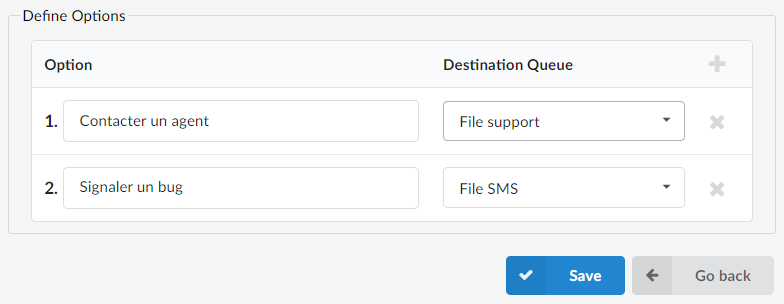
- Options: in the first column, you can add options such as Sales, Support, Accounting, etc. These options allow customers to interact with the chatbot in different ways and can be customized to meet the specific needs of your business.
Destinations: In the second column, you will find the destination queue. This is the queue to which the customer will be directed after selecting one of the options, allowing them to speak with the right agent or the right team based on their needs.
Overall, the Chatbots section of the Omnichannel software feature provides an efficient and personalized service to your customers by handling common requests and directing more complex issues to human agents. This helps improve customer satisfaction, increase efficiency, and reduce costs. With clear visual overviews and customizable options, the chatbot interface is easy to understand and use.
If the Omni application is stopped or not working, an error message will be displayed to inform the user that the Omni application is down. Meanwhile, the Chatbots list will become unavailable and users will not be able to add new chatbots until the Omni application is started.
